
Note: This console is built with web technologies and provides a graphical interface. Its backend service is based on LlamaFactory 0.9.5. It is suitable for quickly configuring model fine-tuning tasks. The current demo supports one model, Qwen3-1.7B, and three datasets: ScienceQA, alpaca_zh_demo, and alpaca_en_demo.
Basic Parameter Introduction
The LlamaFactory console usually refers to its WebUI, also known as LLaMA Board. This interface integrates training, evaluation, inference, and export workflows into a browser page. Users can select parameters such as model, dataset, fine-tuning method, training stage, learning rate, and batch size through forms, reducing the cost of command-line configuration.
General Parameters
| Parameter | Meaning | Description |
|---|---|---|
| Language | Console display language | Chinese or English UI can be selected. |
| Model name | Select a built-in or registered model name | Currently only Qwen3-1.7B is supported. |
| Fine-tuning method | Select the model fine-tuning method | Common options include lora, freeze, full, and oft. |
Train Page Parameters
The Train page is the core console page for configuring training tasks.
| Parameter | Meaning | Recommended Description |
|---|---|---|
| Training stage | Specifies the current task type | For standard instruction fine-tuning, usually select Supervised Fine-Tuning. |
| Dataset | Select the dataset used for training | ScienceQA, alpaca_zh_demo, and alpaca_en_demo can be selected. |
| Learning rate | Optimizer learning rate | Common values are 1e-4 to 5e-5. |
| Training epochs | Number of training epochs | Small datasets can use 2-5; large datasets usually use 1-3. |
| Cutoff length | Maximum input text token length | Samples exceeding this length will be truncated. Common values are 1024, 2048, and 4096. |
| Batch size | Batch size on each GPU | When GPU memory is insufficient, reduce this value first. LoRA fine-tuning is commonly set to 1 or 2. |
| Gradient accumulation | Number of steps accumulated before one parameter update | Used to increase the effective batch size. For example, when batch size is 1 and gradient accumulation is 8, the effective per-GPU batch size is 8. |
| Validation set ratio | Ratio of the training set split into validation data | For example, 0.1 means 10% of the data is used as the validation set. If a separate validation set already exists, keep this value as 0. |
| Learning rate scheduler | Learning rate change strategy | Common options include cosine, linear, and constant. Cosine can be used for general training. |
| Packing | Whether to use Packing | Whether to use the Packing strategy. |
Usage Example
1. Full Fine-Tuning on the ScienceQA Dataset
Applicable scenario: Use an existing instruction dataset to perform full fine-tuning on models such as Qwen.
- Go to the Train page in the console.
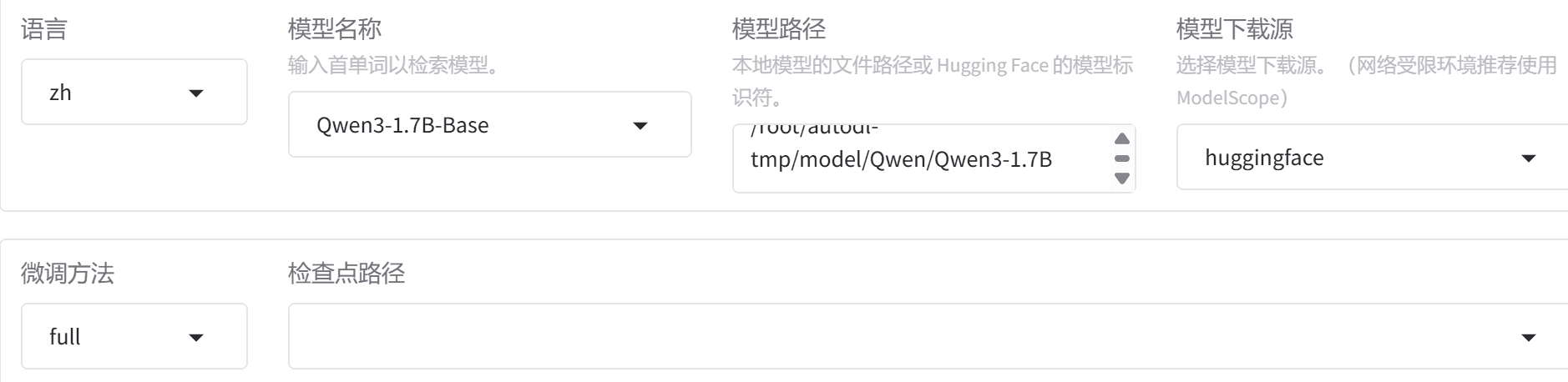
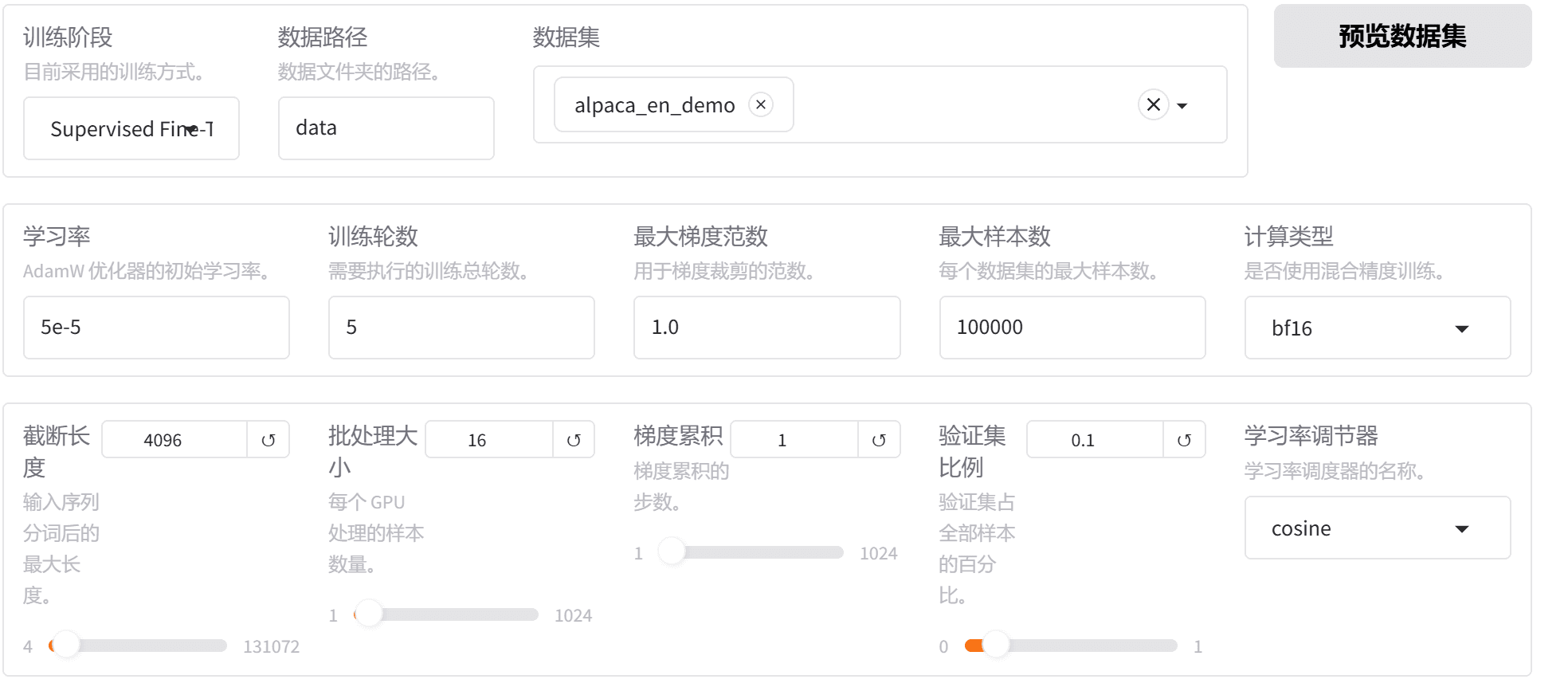
- Configure basic parameters such as model path, fine-tuning method, training stage, dataset, template, and output directory.
- Click Start to begin training.
| Parameter | Example Value |
|---|---|
| Model name | Qwen3-1.7B |
| Model path | /root/autodl-tmp/model/Qwen/Qwen3-1.7B |
| Fine-tuning method | full |
| Training stage | Supervised Fine-Tuning |
| Data path | data |
| Dataset | scienceqa_train |
| Conversation template | default |
| Cutoff length | 512 |
| Learning rate | 5e-5 |
| Training epochs | 8 |
| Batch size | 16 |
| Gradient accumulation | 1 |
| Compute type | bf16 or fp16 |
| Validation set ratio | 0.1 |
| Learning rate scheduler | cosine |
| Maximum gradient norm | 1 |
| Packing | true |
Visual Interface
Result Example
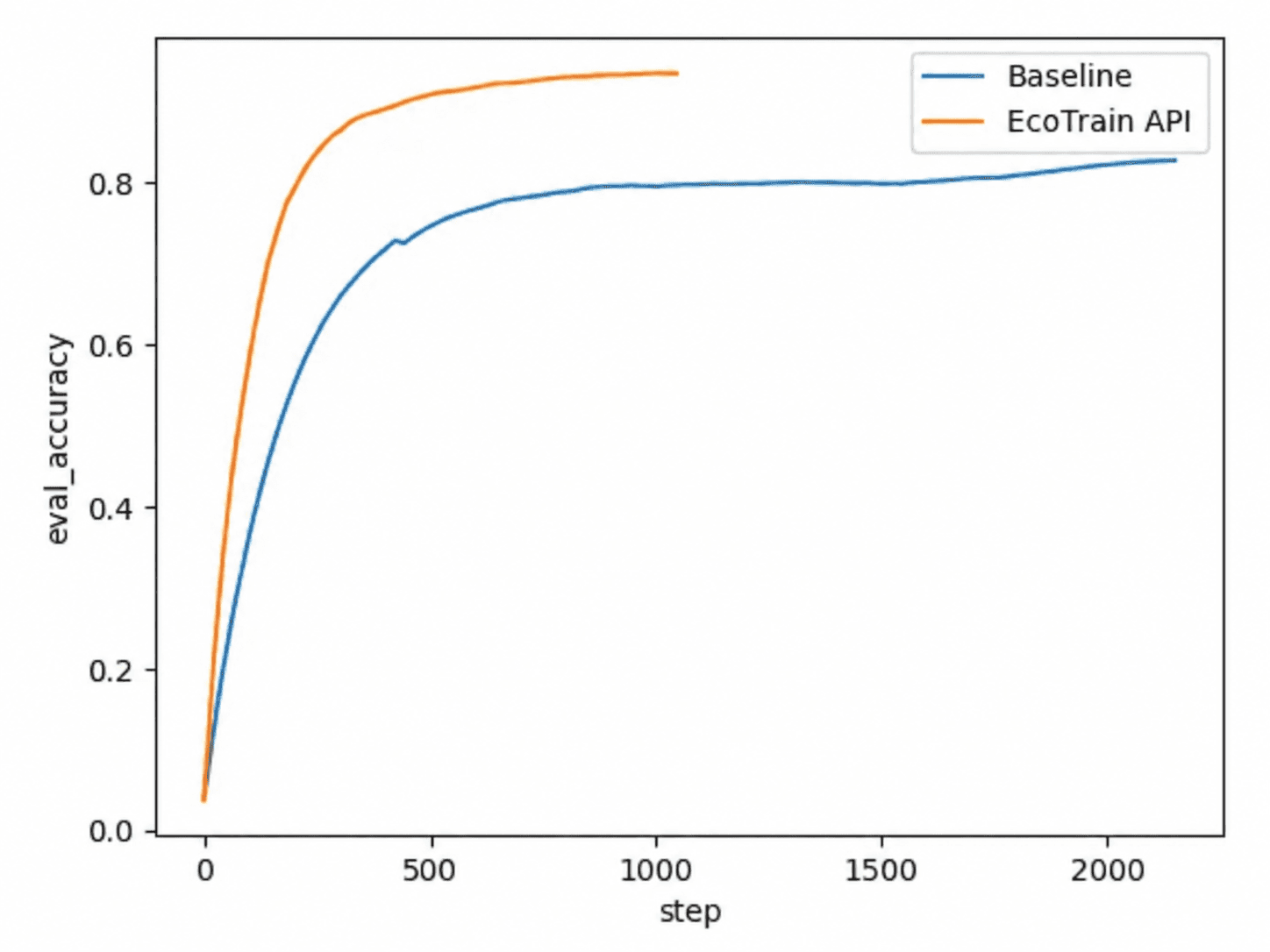
Note: The specific implementation of Packing varies across LlamaFactory versions. The backend service used for this experiment is based on LlamaFactory 0.9.5.
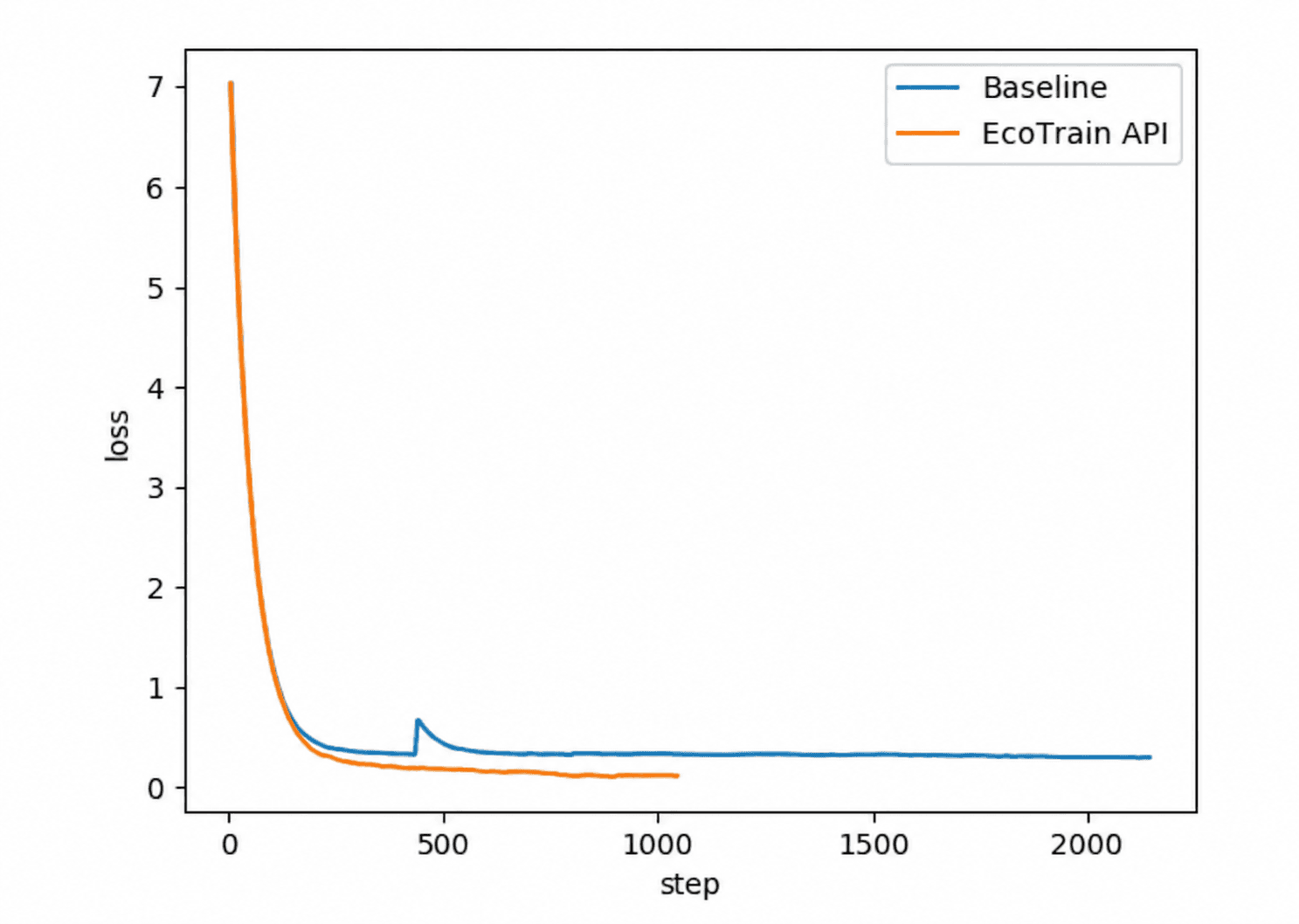
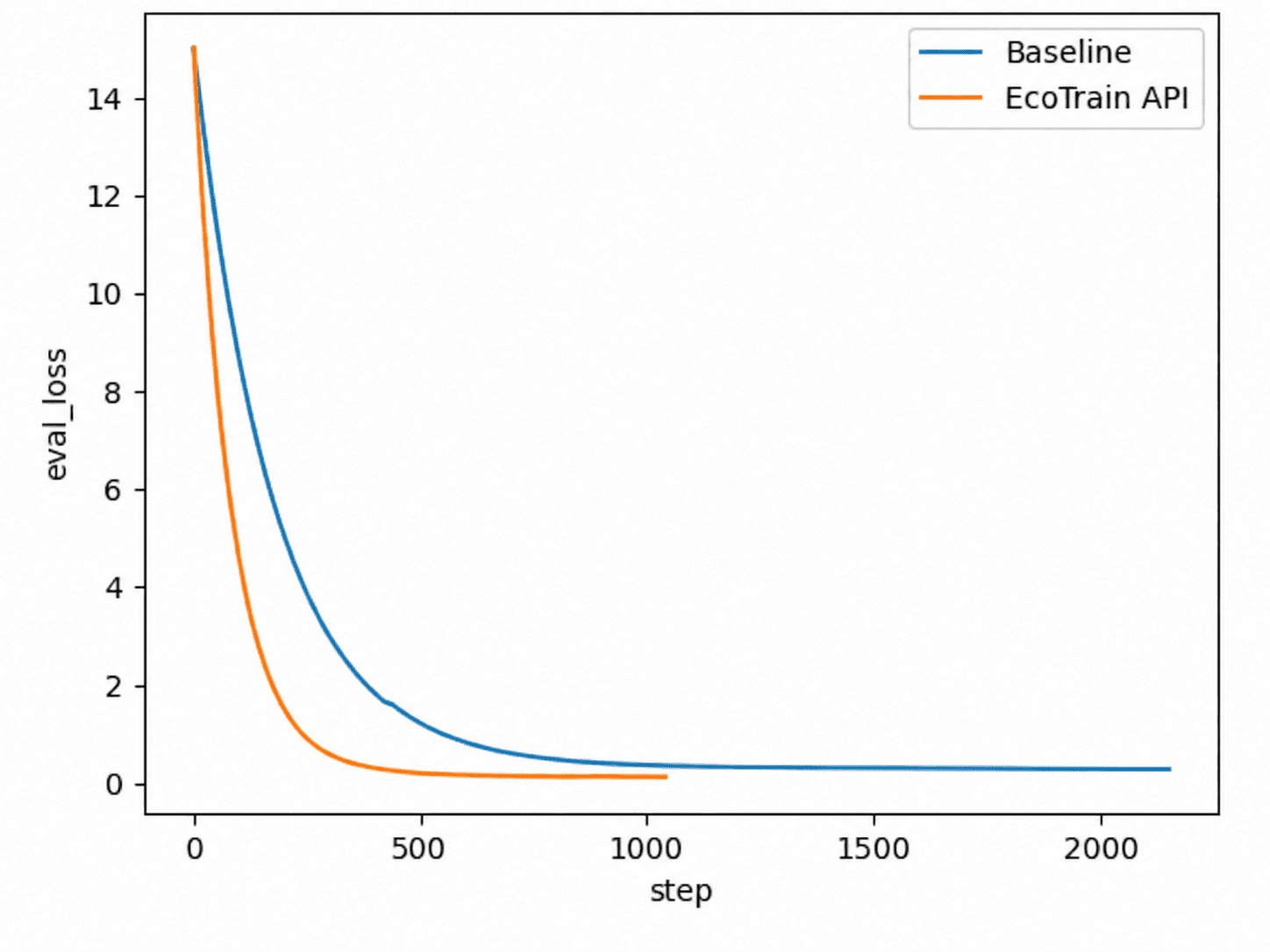
The results show that EcoTrain API achieves significantly higher accuracy than Baseline and does not exhibit overfitting. Training takes about 950 steps, compared with about 2,520 steps for Baseline, saving approximately 62.3% of compute.